With Walt Whitman in Camden: A Digital Edition
Encoding Guidelines
Traubel Tags
Click on sample pages to view a larger version
Sessions
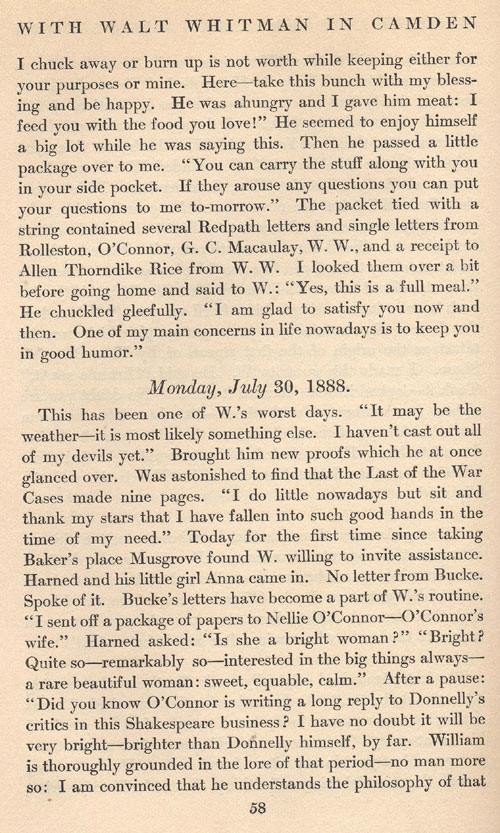
The tags under the "Structure" heading begin with the basic structuring element of Traubel's text, which we call a session. Each session is headed by the day date in italics, followed by a transcription of that days events. "Open Session" will first prompt you to fill in the 4-digit year, 2-digit month, and 2-digit date so that the date can be saved in a standard form, and places your cursor in the correct position to record the date as it is in the text. When finished, the example on this page looks like this:
<div1 type="session">
<head type="main-authorial"><date value="07-30-1888">Monday July 30, 1888 </date>
</head>
Then begin transcribing/tagging with a <p> tag.
When the session is finished, be sure to close the last paragrph and use "Close Session" (which will close the <div> tag ) before opening the next one:
</div1>
Paragraphs
Within each session, any piece of text that is indented or otherwise marked off as a paragraph should be enclosed with the <p> tag. "Paragraph" will give you <p></p> with the cursor in the middle in order to assure that the tag is closed. You can also chose "open p" or "close p" separately.
Page Breaks
The "Page Break" tag will prompt you for a three digit page number (001, 010, 100, etc.), and then <pb type="recto" n="100"/> appear. The text of the page indicated in the tag should follow the tag, so the page on the right would be <pb type="recto" n="003"/>. Be sure to leave one space between the text after the tag. The "recto" in the tag is used because the Whitman DTD recognizes the two sides of a manuscript as "recto" (the assigned front) and "verso" (the assigned back). We have decided to designate all the pages in Traubel's text as "recto." The <pb> tag does not need to be closed, as it serves as a marker instead of enclosing text, and the trailing slash effectively closes the tag.